
Order management

Order management from quote to shipment and invoice

A quote your customer signs online becomes a sales order. You pick it with a scanner, ship it with a label from your carrier and invoice it, in parts if needed. All in the same system as your point of sale and stock.

In short

Order management in Count-IT follows an order from quote to payment: quote, sales order, pick list, packing slip, shipment and invoice. You can deliver and invoice in parts, record down payments and create shipping labels through carriers such as Sendcloud, MyParcel and DHL Parcel.

  • Quotes with online signing, converted into an order or invoice
  • Partial deliveries, partial invoices, down payments and recurring orders
  • Sales orders are part of the Full plan: view the plans

What is order management in Count-IT?

Order management is recording and handling your customers' orders: what has been ordered, what has already been delivered, what has been invoiced and what still needs to be paid. In Count-IT a sales order is not a separate list but a document that works directly with your stock, your warehouses, your invoices and your payments.

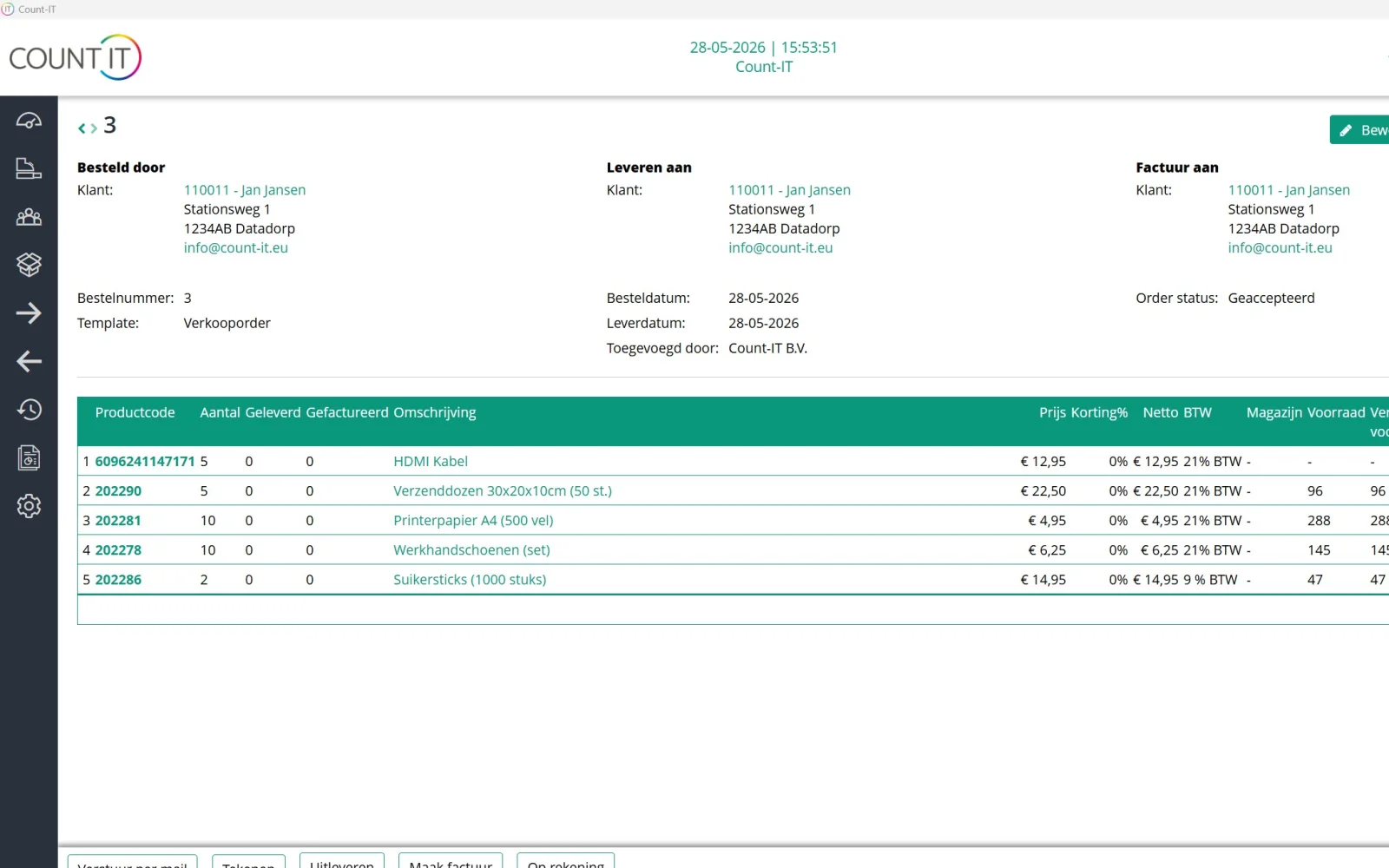
Every step has its own status. An order can, for example, be paid but not yet delivered, or partly delivered and partly invoiced. The Delivered and Invoiced columns show where you stand on each line. When invoicing, Count-IT only offers the quantities that have not been invoiced yet, so nothing is invoiced twice.

Orders come in through the back office, the POS, a connected webshop or the B2B ordering portal, where business customers place orders themselves. They all end up in the same order processing. You then create the invoice with invoicing in the same system.
Features

Everything for your orders in one place

Settings let you decide how automated or manual each step is.

Quotes with online signing

Create a quote and send it by email. The customer signs online with a signature and name; you and the customer's sales managers receive an email about it. You then convert the quote into an order or invoice.

Sales orders

Record lines, notes, customer and delivery address, delivery date, warehouse and shipping method. If you like, show separate fields for invoice to, ordered by and deliver to.

Picking with a scanner

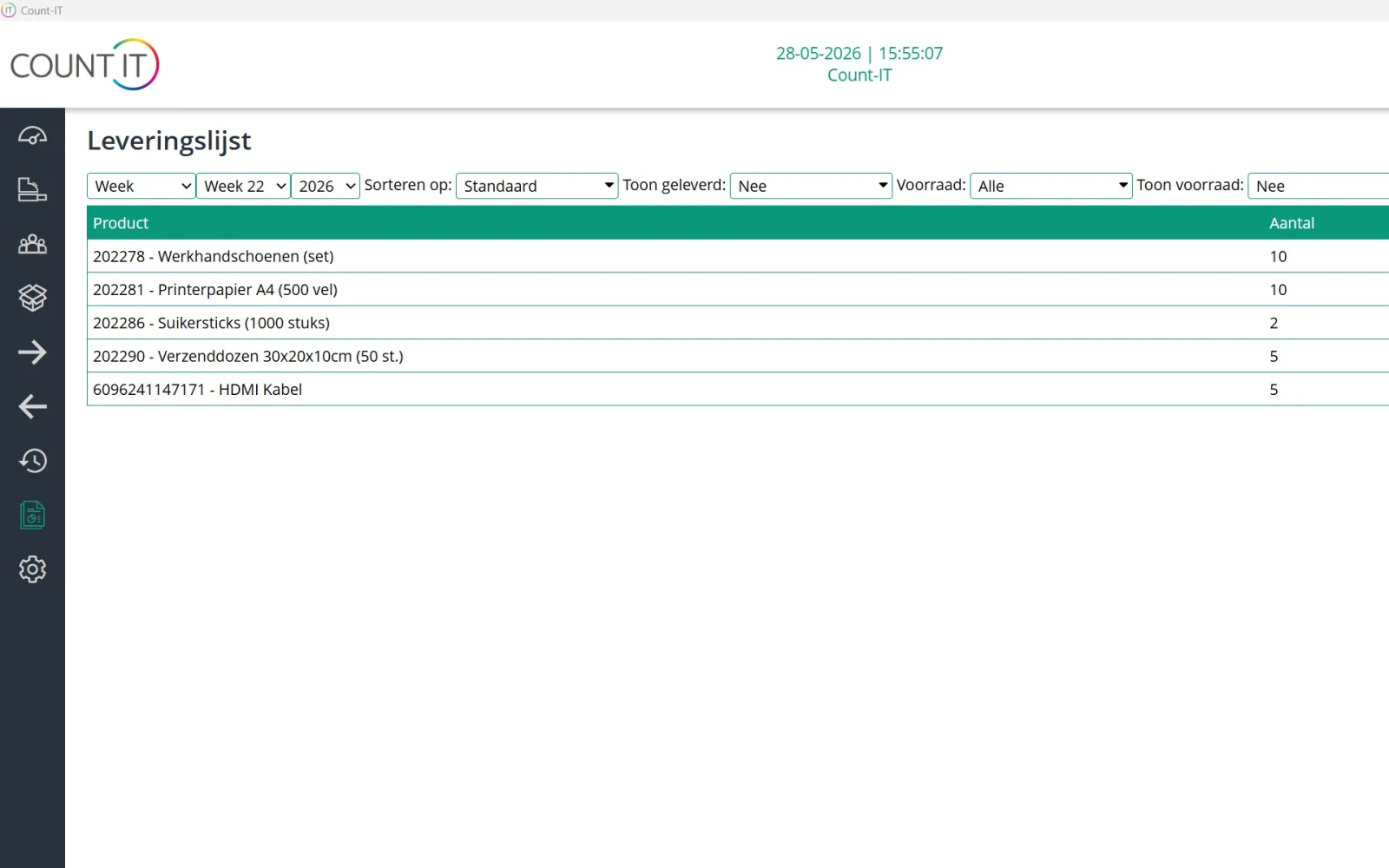
Create a pick list from an order and record the picked quantities by scanning or entering them. While picking you always see picked/total, and after picking Count-IT can invoice automatically.

Packing slip, shipment and label

Create a shipment with a label from a packing slip or order via Sendcloud, MyParcel, DHL Parcel, GLS, QLS, Parcel Pro or Sendy, with tracking and pickup points where the service supports them. The packaging and shipping advice divides the items over suitable boxes.

Deliver and invoice in parts

Deliver and invoice only what is ready now; the rest stays open. You record a down payment on the order and link it to the invoice later.

Recurring orders

For regular deliveries you set up a recurrence with customer, lines, interval, start date and payment method. Choose whether the order is emailed or invoiced automatically.

Delivery dates and order limits

Set a minimum delivery date, excluded weekdays and blocked dates. Order limits cap how many products can be ordered in a period or on a weekday, for example per product group.

Orders from the POS

Take an order in your shop: add products and a customer on the POS and turn it into an order. The customer pays the down payment straight away.

How it works

From quote to paid invoice

  1. Quote

    You send a quote, the customer signs online and you convert the quote into a sales order without retyping anything.

  2. Check the order

    You check customer, delivery address, date, warehouse and lines. Planned outgoing stock is immediately included in your stock management.

  3. Pick and ship

    You pick with a pick list and create a packing slip and a shipment via your carrier. The customer can automatically receive a shipping email.

  4. Invoice

    You invoice the quantities not yet invoiced, manually, after picking or automatically, and the payment is recorded or matched.

To be fair

What Count-IT does not do (yet)

So you know in advance whether it fits.

  • Customers cannot register returns through the ordering portal; you handle a return yourself in Count-IT.
  • The EDI integration is for purchasing from suppliers, not for receiving sales orders from your customers.
  • The shipping advice picks the cheapest proposal from your own boxes and recorded rates. You check surcharges, extra options and protective material yourself, and the advice does not automatically switch to another shipping method.
  • Sales orders are part of the Full plan, not Light.
Frequently asked questions

Questions about order management

Can a customer sign a quote online?

Yes. The customer opens the quote via the link in the email and signs with a signature and, optionally, a name. Your company and the customer's sales managers then receive an email with the time and the name of the signatory. A quote can only be signed once.

Can I deliver and invoice an order in parts?

Yes. You only record the quantities you deliver or invoice now; the rest stays open for a next delivery or partial invoice. Each line shows how much has already been delivered and invoiced.

How do I process a down payment on an order?

Switch on the setting Allow payment on order and record the down payment on the order. The remaining amount stays open. When you create the invoice, the order payment is carried over or matched. You can also set an order to be delivered or invoiced only after full payment.

Which carriers can I create shipping labels with?

Count-IT integrates with Sendcloud, MyParcel, DHL Parcel, GLS, QLS, Parcel Pro and Sendy for shipments and labels, and depending on the service also tracking and pickup points. For fulfilment there are integrations with Monta and 3BM.

What is the packaging and shipping advice?

When you create a shipment from a packing slip or order, the advice divides the physical items over suitable boxes and compares box costs with your recorded shipping rates. You see the contents, dimensions, weight and costs per box. The shipment only changes once you accept the advice.

Can Count-IT invoice or deliver orders automatically?

Yes, with separate settings. You choose, for example, no automatic invoice, a final invoice straight away or processing on account, and separately whether delivery happens automatically after invoicing. Invoicing after picking is also possible.

Can I create an order from the POS?

Yes. Add products and a customer on the POS and choose the button to create an order. Then check the delivery date, shipping method and warehouse. A payment on the order can later be linked to the invoice.

Which plan includes order management?

Purchasing, sales orders and stock management are part of the Full plan. You can try Count-IT free for 30 days.

See your order process in Count-IT

In a demo we show how a quote becomes an order, shipment and invoice, using your way of working as the example.