
Inventory management

Inventory management that stays in step with your POS and web shop

Every sale at the point of sale, every delivery and every purchase receipt updates your stock straight away. So you know per warehouse and location what is in stock, what is coming in and what you need to reorder.

In short

Inventory management in Count-IT is part of the same system as your POS, orders and purchasing. You keep stock in one or more warehouses and storage locations, count with a scanner and let the order advice propose a purchase order that you approve yourself.

  • Current, planned incoming and planned outgoing stock per warehouse and location
  • Stock counts and full stocktakes, also with a scanning terminal
  • Part of the Full plan: view the plans

What is inventory management in Count-IT?

Inventory management means keeping track of how much of each product you have, where it is and when you need to reorder. In Count-IT this does not happen in a separate program, but in the same system you sell with: a sale or delivery books stock out, a purchase receipt or correction books stock in.

Besides the current stock, you also see the planned incoming and outgoing stock, for example from open purchase orders and sales orders. From this, Count-IT can calculate the available stock: what you can actually sell, namely the current stock minus what has already been promised, optionally plus what is on its way.

Do you also sell online? With a web shop integration your stock stays in sync with WooCommerce, Shopify, Magento or CS-Cart, so you do not sell what is no longer there.
Features

Everything for your stock in one place

With settings you decide how strictly or flexibly Count-IT handles your stock.

Multiple warehouses and locations

Keep stock in one or more warehouses with storage locations. Choose a default warehouse per register, order or invoice, or per device, and a different warehouse per line if needed.

Counting with a scanner

Count a shelf or product group in between with a stock count, or do a complete inventory with a full stocktake. With a scanning terminal (PDA) you scan the products directly.

Transfers and write-offs

Move stock between warehouses. Write off stock with your own reasons, such as breakage or shrinkage, also directly from the point of sale. Write-offs appear in a report of their own.

Minimum and maximum stock

Set a minimum and maximum stock per product. Count-IT can periodically send you an email with products that have fallen below their minimum.

Order advice and purchase orders

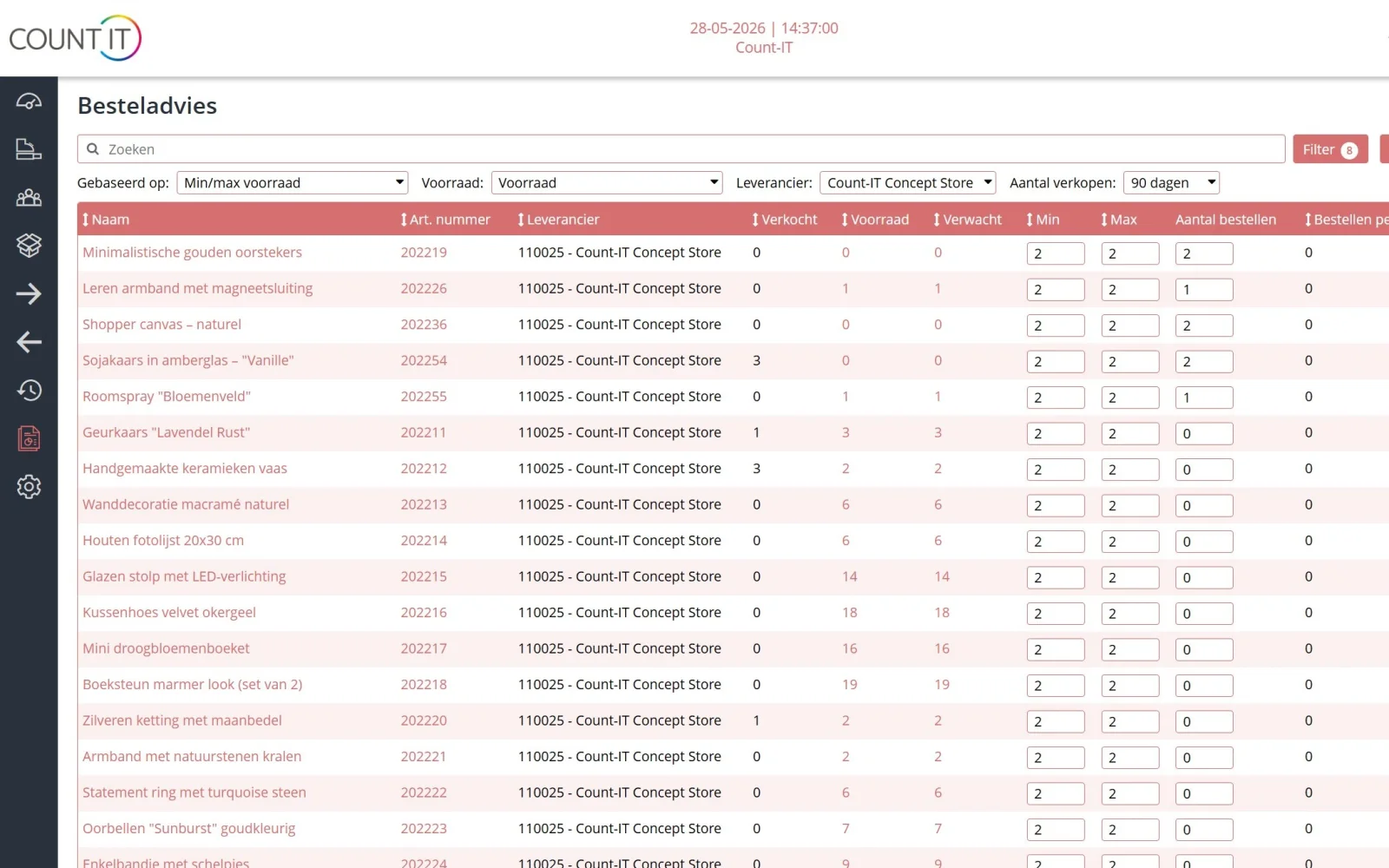
The order advice makes a proposal per supplier based on stock and sales. You check it and send the purchase order by email or through a supplier integration.

Receiving and booking in

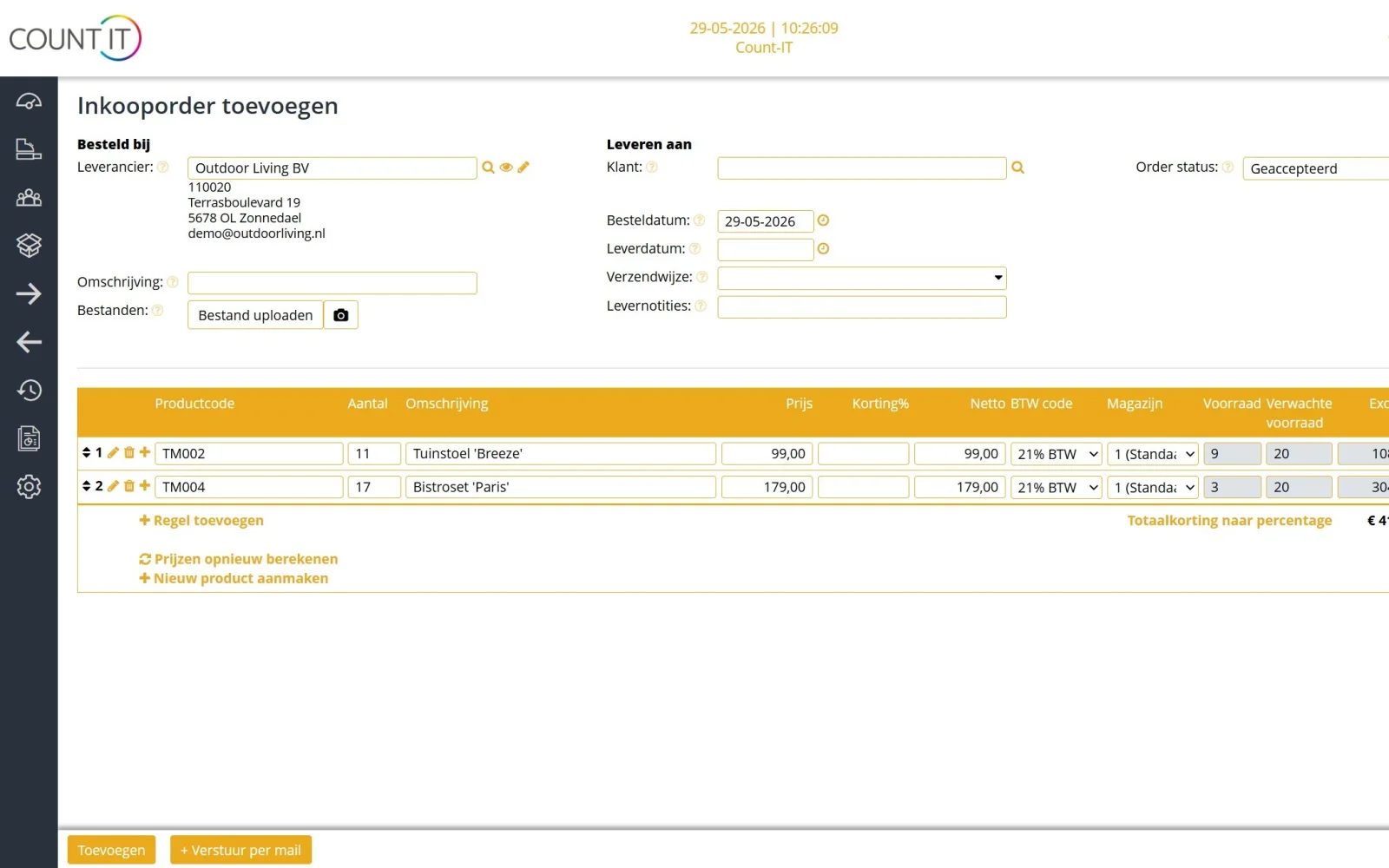
Book the receipt of a purchase order and the stock is updated. You can also create a purchase order from a stock count or a sales order.

Stock in sync with your web shop

With an integration with WooCommerce, Shopify, Magento or CS-Cart you sell online and in store from the same stock.

Negative stock under control

Decide for yourself whether stock may go below zero, whether Count-IT warns you or blocks the sale. Financial booking of stock movements to your general ledger is also possible.

How it works

From sale to reorder

  1. Sell

    A sale at the point of sale, in the web shop or through an order books the stock out of the right warehouse.

  2. Spot

    If a product falls below its minimum stock, you see it in the order advice and, if you like, in an email.

  3. Order

    You turn the advice into a purchase order, check quantities and prices and send the order.

  4. Receive

    When the goods arrive, you book the receipt, optionally with a scanning terminal, and your stock is up to date again.

To be honest

What Count-IT does not do (yet)

So you know in advance whether it fits.

  • Count-IT does not order automatically: the order advice is a proposal, and nothing goes to the supplier until you send the purchase order.
  • Batch or lot numbers with best-before or use-by dates are not tracked; serial numbers are.
  • There is no production planning (MRP) or demand forecasting; there is a production list with ingredients and packaging.
  • Inventory management is part of the Full plan, not Light.
Frequently asked questions

Questions about inventory management

Can I keep stock in multiple warehouses?

Yes. Count-IT supports one or more warehouses with storage locations. You view the stock per warehouse and per location, and choose a default warehouse per register, order or invoice.

What is the difference between a stock count and a full stocktake?

A stock count processes a specific set of counted lines, for example one shelf. A full stocktake combines several counts into a snapshot of your entire stock and then also shows which products have not been counted.

Does Count-IT order automatically from my supplier?

No. The order advice makes a proposal based on stock and sales. You check it yourself, and only when you send the purchase order, by email or through a supplier integration, does anything go to the supplier.

Does the stock stay in sync with my web shop?

Yes, with an integration with WooCommerce, Shopify, Magento or CS-Cart. For each integration you set which system leads for stock.

Can I count with a scanner?

Yes. With a scanning terminal (PDA) you count stock, do a complete inventory and receive goods. GS1 barcodes are supported.

Do I get a notification when stock is low?

Yes. With the setting Mail below minimum stock, Count-IT periodically sends an email with products that have fallen below their minimum. You set the address, the interval and an absolute lower limit yourself.

Which plan includes inventory management?

Inventory management, purchasing and sales orders are part of the Full plan. You can try Count-IT free for 30 days.

See your stock in Count-IT

In a demo we show how POS, stock and purchasing work together, using your products as an example.