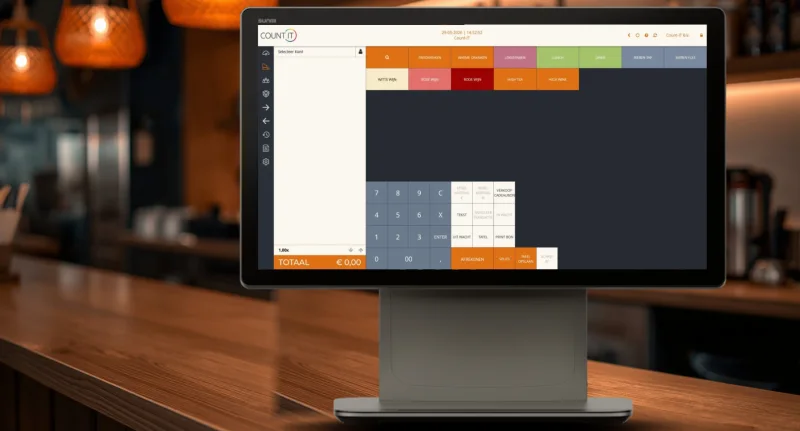
From order to payment, efficiency at its best. Count-IT is a hospitality POS for restaurants, cafés and lunchrooms: your staff take orders at the table on a tablet, tickets go straight to kitchen and bar, and the bill always adds up. That leaves more time for your guests.
In short
Count-IT is a hospitality POS system for restaurants, cafés, bars and lunchrooms, with floor plans, table-side ordering on a tablet or phone and tickets sent to kitchen and bar printers. It costs €35 (Light) or €69 (Full) per till per month, excl. VAT.
Tables and floor plans, with order status per table
Staff take orders at the table on a tablet or phone
Split bills per item, tips and a connected card terminal
A hospitality POS system is a till set up for table service: you ring up orders on a table, send them to the kitchen and bar, and settle the bill later, together or split. Count-IT does this in the browser or app, on a fixed till and on your staff's tablets and phones, all using the same data.
In hospitality everything has to be right, from a quick order to a flawless bill. Because till, stock, gift cards and reports live in one system, you never keep anything twice. Read how to set up tables, floor plans and kitchen tickets in the knowledge base on hospitality.
Table management and floor plans
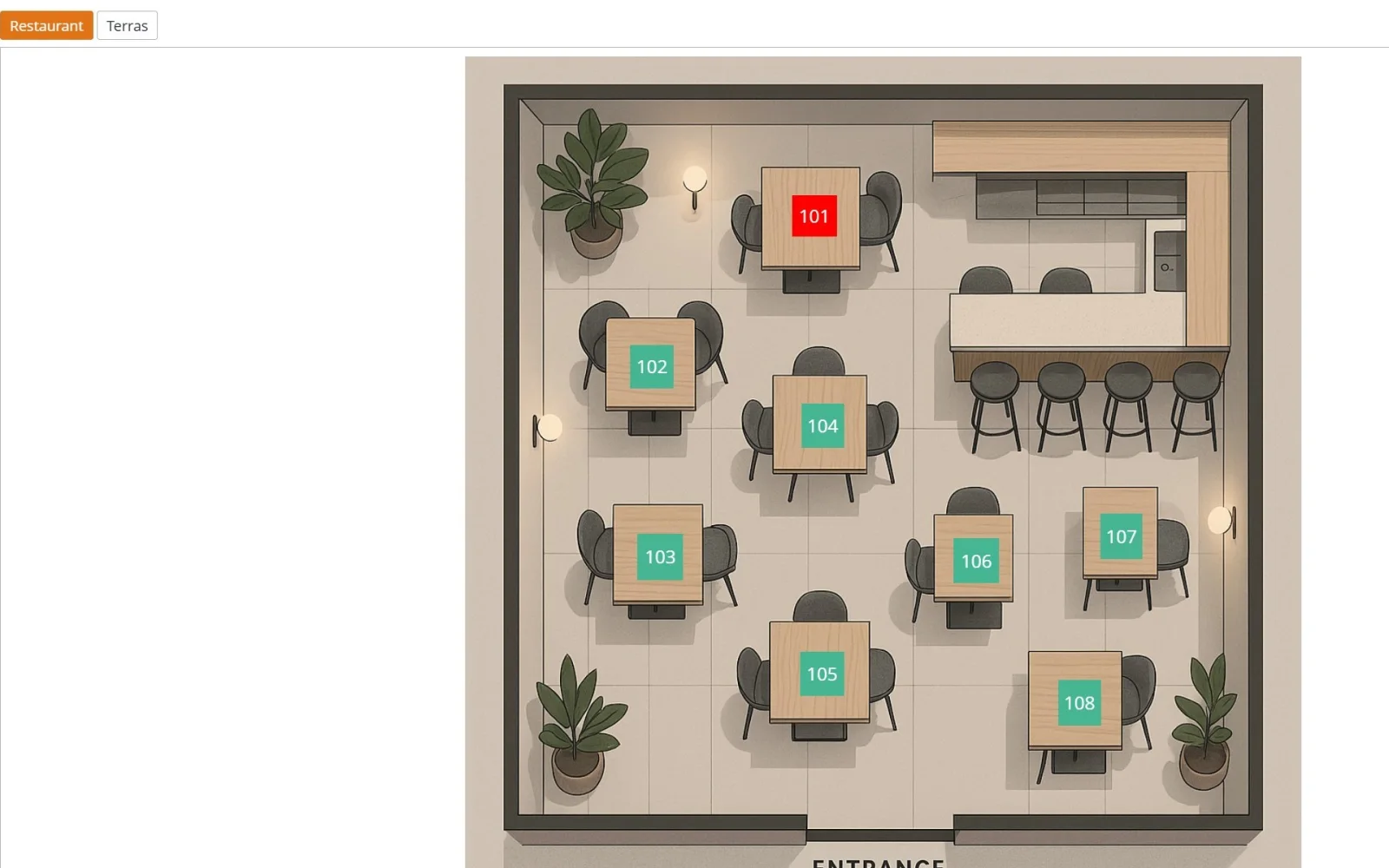
Choose tables on your own floor plan or in a table list, put receipts on hold on a table and reopen it later to add orders or settle the bill.
Ordering at the table via tablet
Your staff take orders on a tablet or phone, straight onto the right table. You decide the button layout per device.
Tickets to kitchen and bar
Choose the printer per product or product group: dishes go on the kitchen ticket, drinks on the bar ticket, with the table number on it.
Order status and corrections
Badges show per table what has already been ordered, what is new and what has been corrected. A table open on another device can be taken over.
Splitting, tips and payment
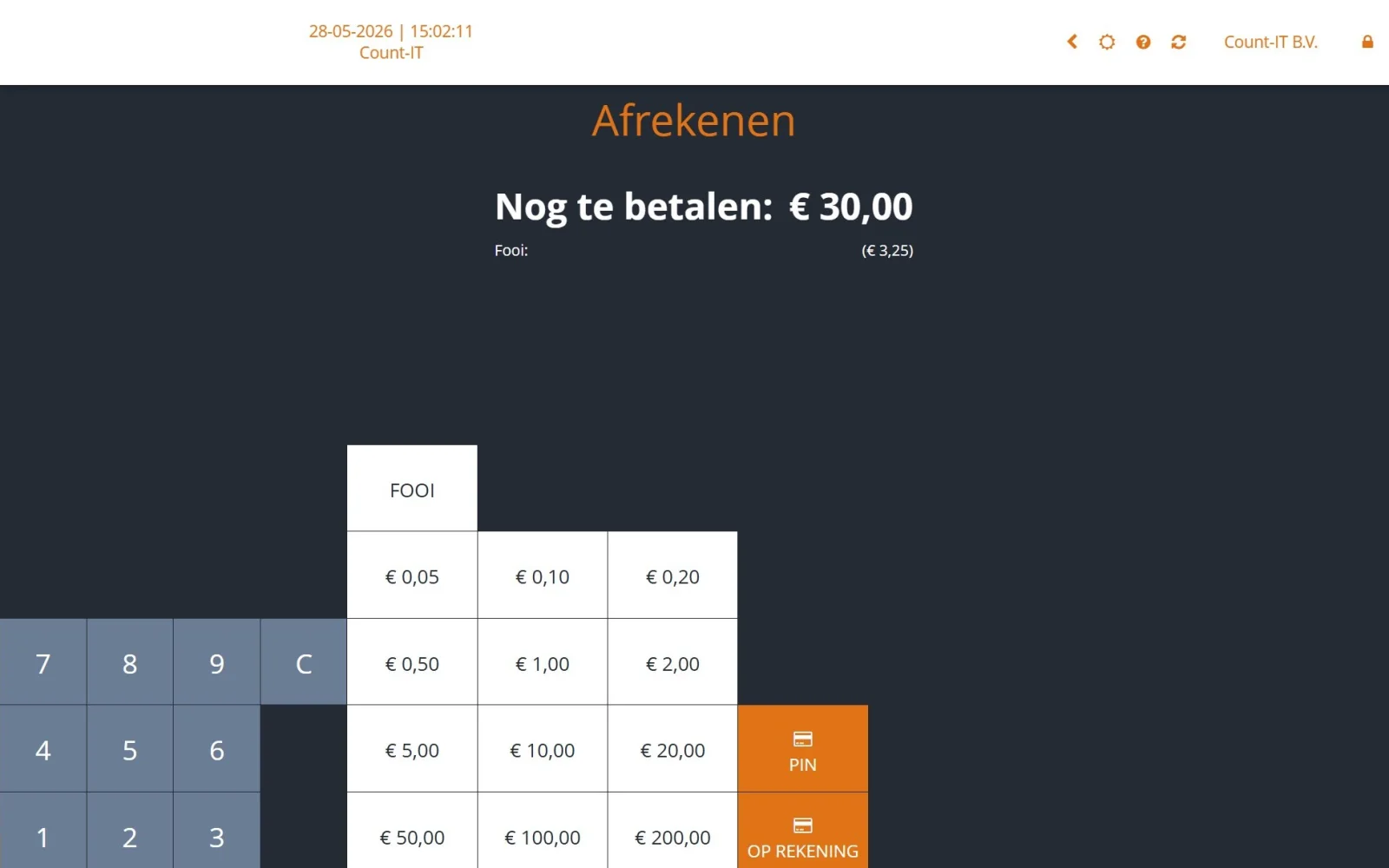
Split the bill per item, combine payment methods with partial payments and record tips with the tip button. Card payments run through a connected terminal.
Menus and bundles
Combine products into a bundle, such as a lunch menu, and manage prices centrally for all your locations.
Stock and purchasing
Stock is updated with every sale. When a product drops below its minimum, you get an order proposal that you check and approve yourself.
Gift cards and loyalty points
Sell and redeem gift cards at the till, including partial redemption, and reward regulars with loyalty points.
Control and insight
Staff switch users with a PIN, security codes protect refunds, discounts and the cash drawer, and reports show turnover per product and employee.
See it in action
Fast at the bar, clear at the table
Real hospitality screens, from the table plan to paying with a tip.
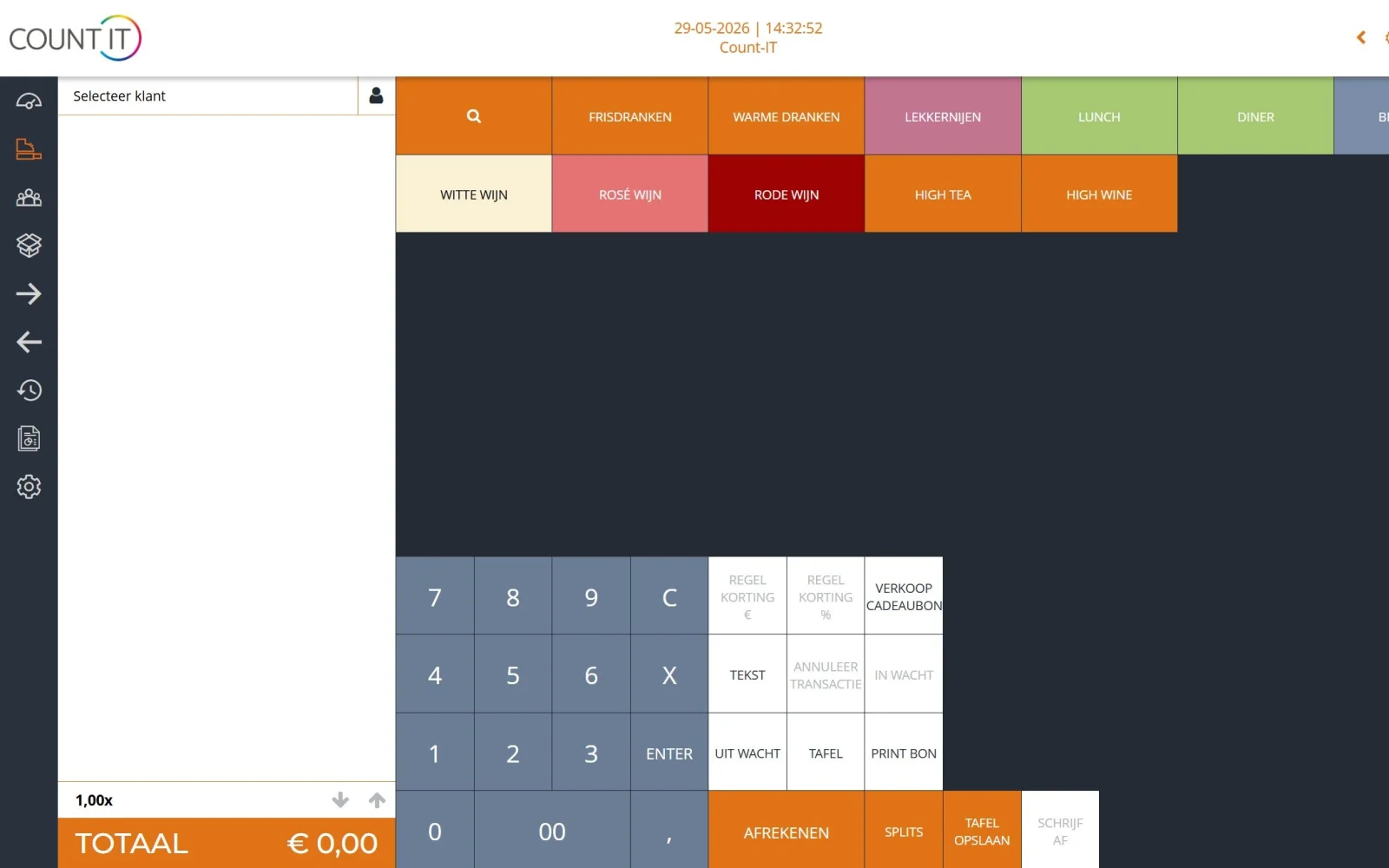
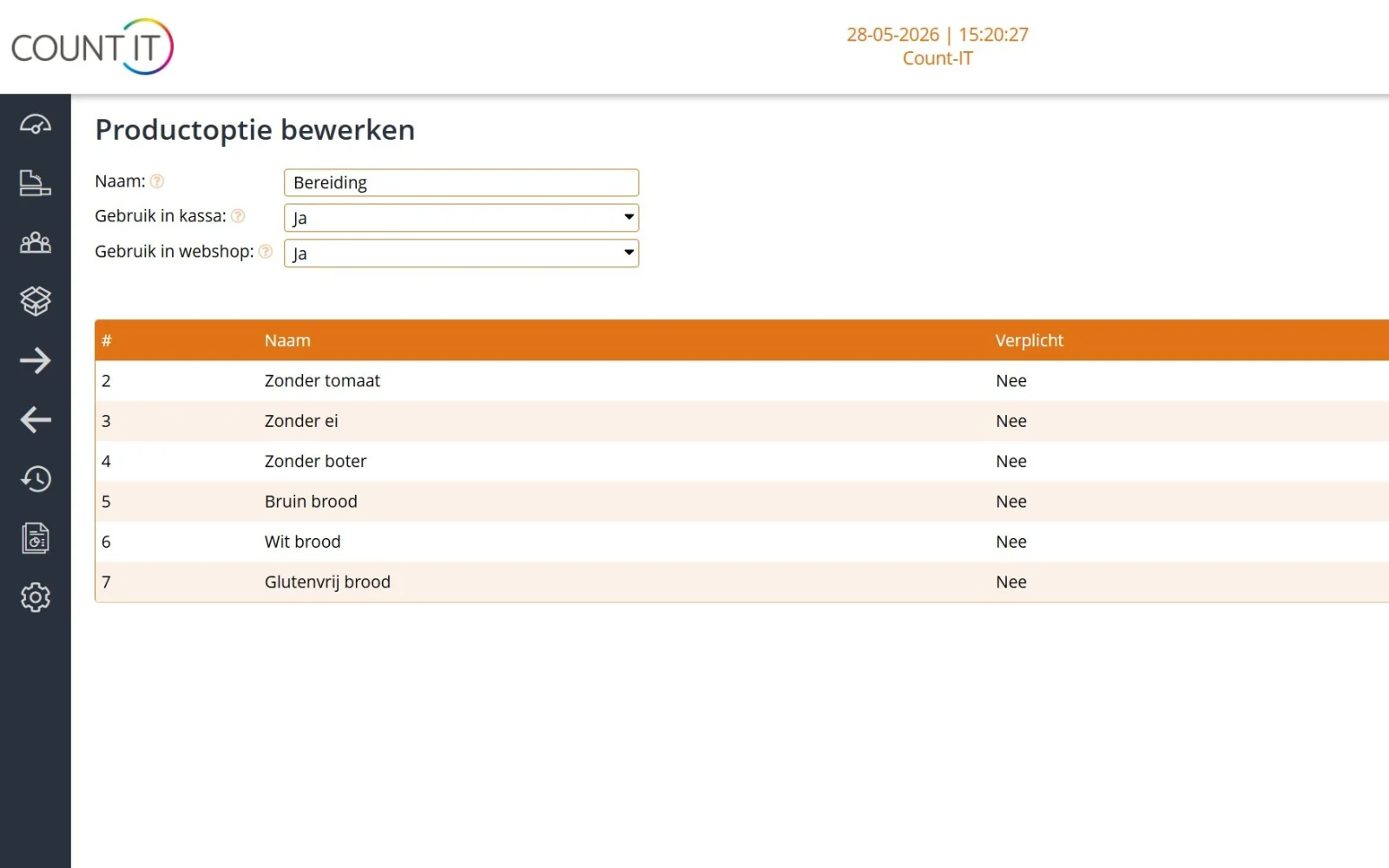
start.count-it.euTill screen with colour-coded product groups, from soft drinks to high wine.start.count-it.euFloor plan per area, such as restaurant and terrace: pick a table with one tap.start.count-it.euPaying with a tip: the tip amount is shown separately on screen.start.count-it.euProduct options such as "no egg" or "gluten-free bread", chosen when ringing up the item.
Real Count-IT screens with sample data. Click a screen to enlarge it.
Which kind of venue?
A hospitality POS for your type of venue
A restaurant works differently from a café or a lunchroom with a terrace. This is how Count-IT fits each one.
POS system for a restaurant
In a restaurant, everything revolves around the table. You lay out your venue with floor plans per room, staff ring up dishes on the tablet and the kitchen immediately gets a ticket with the table number. Order status badges show what has already been ordered and what is new, and at the end guests split the bill per item or pay with several payment methods.
POS system for a café or bar
Behind the bar, speed is everything. With your own button layout you ring up drinks in a few taps, put a tab on hold on a table and settle straight away at the bar. Staff switch users with their own PIN, security codes protect the cash drawer, and day closing with a cash count wraps up the evening neatly.
POS system for a lunchroom or terrace
In a lunchroom, table service and paying at the counter alternate. On the terrace your staff work with a tablet, and a colleague can take over a table that is open on another device. If you also sell products to take away, the same till keeps track of the stock. Read more about the basics in the knowledge base on the POS.
Table 4 4 guests · 38 min€86.50
Kitchen ticket 2× Burger, 1× SaladPrinted
Bar ticket 3× Craft beer, 1× ColaPrinted
Table 7 Split billPaid ✓
From table to kitchen
Everyone knows straight away what needs doing
Orders go directly from the table to the right printer in the kitchen or bar. No notes, no misunderstandings, and the bill is always right. Count-IT works with kitchen and bar printers, not kitchen display screens; guests order through your staff, not via a QR code.
Set the printer per product or product group
Table number on kitchen, bar and customer receipts
Print tickets several times if needed
Corrections per table visible with order status badges
Compare
Separate till + separate packages vs Count-IT
Many venues work with a basic till, a stand-alone card machine, paper notes to the kitchen and a spreadsheet for purchasing. This is how that compares with one hospitality POS system.
Comparison between a separate till with separate packages and Count-IT in hospitality
Area
Separate till + separate packages
Count-IT
Taking orders
Written on paper and retyped at the till
At the table on a tablet or phone, straight onto the right table
Kitchen and bar
Passing on notes or calling out orders
Kitchen and bar tickets sent automatically to the right printer
Settling the bill
Splitting by hand, retyping the amount on the card machine
Splitting per item, partial payments and a connected card terminal
Stock and purchasing
Keeping a stock list and checking what has run out yourself
Stock updated with every sale, with an order proposal you approve
Guest loyalty
A separate stamp card or gift card system
Loyalty points and gift cards in the till
Control
Little insight into discounts, refunds and the cash drawer
A PIN per employee, security codes and a report on suspicious employee activity
Costs and support
Several subscriptions and suppliers
Fixed price per till; support, updates and unlimited users included
What to look for when choosing a hospitality POS system
A hospitality POS has to work as well on the busiest night of the year as on a quiet Monday. Go through these points before you choose.
Table management: can you create your own floor plan and see per table what has been ordered?
Ordering at the table: can staff order on a tablet or phone, using the same data as the fixed till?
Kitchen and bar: can you decide per product or product group which printer the ticket goes to?
Settling the bill: can you split per item, combine payment methods and record tips?
Card payments: does the till connect to your card terminal so you never retype amounts?
Outages: can you keep working if the internet drops out for a while?
Tax requirements: does the system meet the rules in your country, such as the TSE in Germany or the hospitality rules in Belgium?
Costs and help: what do you pay per till, and do you get personal support when it is busy?
Hospitality hardware: till, tablets and printers
Count-IT runs on a touchscreen till and on your staff's tablets and phones. For the kitchen and bar you need receipt printers; we supply hospitality hardware such as touchscreen tills, receipt printers, cash drawers and connected card terminals, pre-installed and tested. Read how to set up printers in the knowledge base on hardware and printers.
Tax rules in Germany and Belgium
In Germany, Count-IT supports the KassenSichV with a TSE via Fiskaly and the DSFinV-K export. Belgian hospitality businesses that serve meals may be required to use a registered cash register system (GKS, the so-called white till); if your venue is in Belgium, discuss with us in advance whether Count-IT suits your situation. Read more about certification and tax requirements.
Card payments
Card terminal integrations
With a connected card terminal, the till sends the amount straight to the terminal. Count-IT integrates with these providers, among others.
Yes. Per product or product group you set which printer the ticket goes to, so dishes appear on the kitchen ticket and drinks on the bar ticket. Count-IT works with kitchen and bar printers, not kitchen display screens.
Can my staff take orders on a tablet at the table?
Yes. Count-IT works on tablets and phones. Your staff ring up the order on the right table and the tickets go straight to the kitchen and bar.
Can guests order themselves via a QR code?
No. With Count-IT your staff take the order, on the fixed till or on a tablet or phone. QR-code ordering by guests is not part of the system.
Can I split a bill and process tips?
Yes. With bill splitting a guest pays only for their own items, partial payments let you combine payment methods and the tip button records a tip.
How much does a hospitality POS system cost with Count-IT?
Light costs €35 and Full €69 per till per month, excluding VAT. Inventory management, purchasing and integrations are part of Full. Support, updates and unlimited users are included; on Full, a volume discount applies from the second till per location. Hardware is purchased separately. View pricing.
Does Count-IT also work for a café or bar without table service?
Yes. Tables are optional: you can also settle straight away at the bar or put a receipt on hold. With your own button layout you ring up drinks quickly.
Is Count-IT suitable for hospitality in Germany and Belgium?
In Germany, Count-IT supports the KassenSichV with a TSE via Fiskaly. Belgian hospitality businesses that serve meals may need a registered cash register system (GKS); please discuss your situation with us in advance. See certification.
Does Count-IT keep track of my venue's stock?
Yes. Stock is updated with every sale. When a product drops below its minimum, Count-IT creates an order proposal that you check and approve yourself before the purchase order is sent.